
Security & Compliance
Pro feature
Security & Lockout: Real IP Detection, Bot Protection & Data Privacy
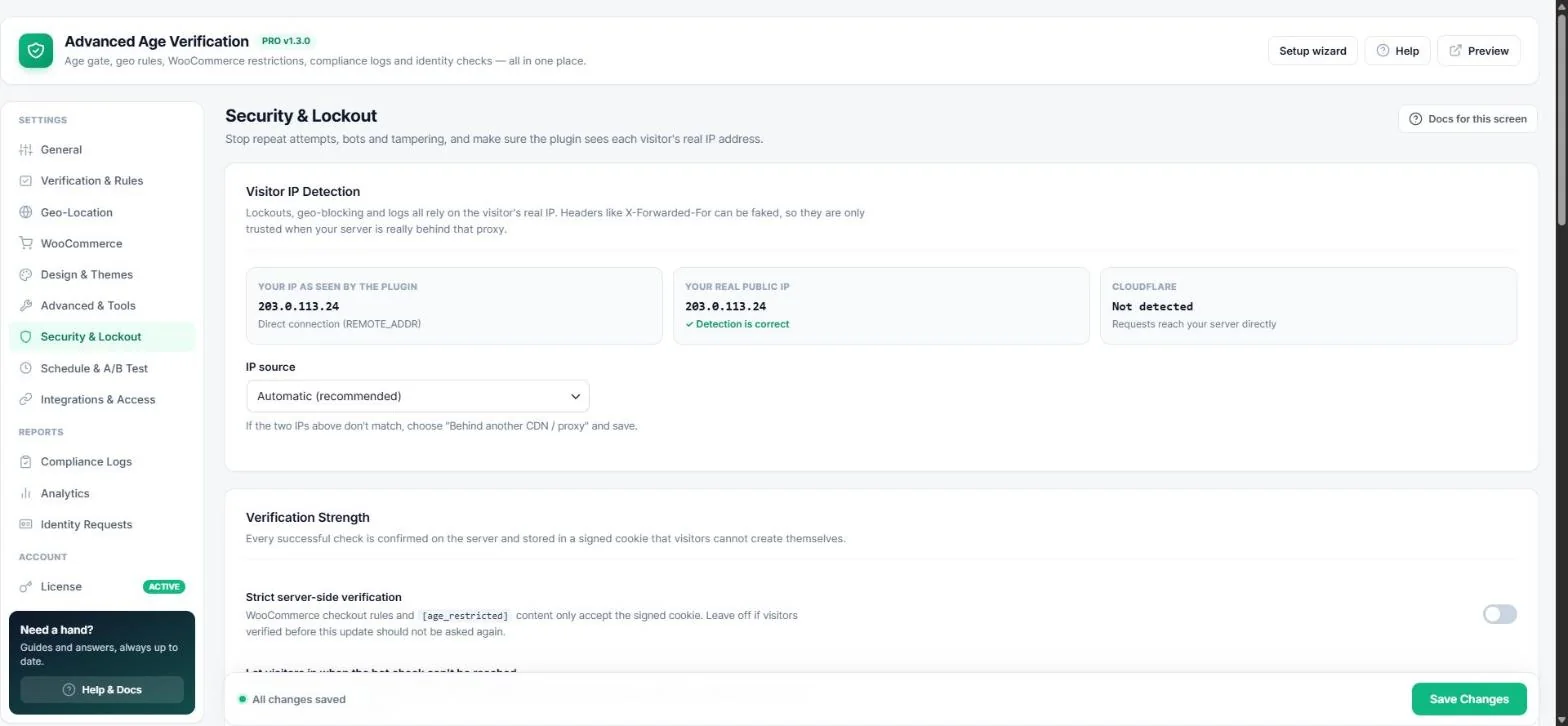
Stop repeat attempts, bots and tampering — and make sure the plugin sees each visitor's real IP address. Open Age Verification → Security & Lockout.
Visitor IP detection
Lockouts, geo-location and logs all rely on the real IP. The screen compares your IP as seen by the plugin with your real public IP and checks for Cloudflare.
- Keep IP source on Automatic.
- If the two IPs do not match, choose Behind another CDN / proxy (or Always behind Cloudflare) and save.
Verification strength
- Every successful check is confirmed on the server and stored in a signed cookie visitors cannot create themselves.
- Strict server-side verification — WooCommerce checkout rules and
[age_restricted]content only accept the signed cookie. - Let visitors in when the bot check can't be reached — keep off (recommended).
Lockout after a failed check
Turn on Strict lockout to stop people from simply going back and lying about their age. A failed check locks the visitor out for the number of hours you choose (default 24) and shows your lockout message.
Fraud & tamper protection
- Inspect-element blocker — disables right-click, F12 and Ctrl+Shift+I while the gate is open.
- Maximum age — for example 100, to catch people who scroll the year to 1900.
- Bot protection — Cloudflare Turnstile (recommended, privacy-first) or Google reCAPTCHA v3 with a minimum score.
Data & privacy
- Encrypt stored ID documents (AES-256) — files can only be opened from the dashboard.
- Delete ID documents after X days and delete compliance log entries after X days — a daily task cleans up automatically.
- Remove all plugin data when the plugin is deleted.
Important: Don't change your WordPress security keys while encrypted documents are stored — they are needed to open them.
Read next
Previous
Design & Themes: Layouts, Colour Styles, Fonts & Backgrounds
Next
Compliance & Legal Vault: Audit Logs, CSV & PDF Reports
Was this guide helpful?
Thanks for your feedback!